A takeoff is not a bid. Here is the rest of the loop.
This page is for contractors who already know how to count and are shopping construction bid software because the bid is still scattered. A takeoff is not a bid. The bid is materials priced, labor or sub quotes on every trade, coverage that does not double-count, and a proposal you can send. Tools that stop at the list leave that pile on your desk.
If you wanted the AI-evidence story, use the AI construction takeoff page. If you wanted measuring versus a drafted list, use construction takeoff software. If you are an owner-operator bidding after the field day, the small-contractors page is the customer version of this loop. This page is the functional argument: after the count, the same job has to be priced, quoted, reconciled, and exported.
Solo at $200 is five successful takeoffs and already includes RFQs. Crew at $399 is fifteen — the featured plan (Most Popular: Full Bid Loop) when you are coordinating self-performed work and subs. Shop at $699 is forty. RFQs are on every plan. Failed runs do not count.
The problem
The professional mess is four documents that do not share a trail: the takeoff, the supplier tabs, the sub email thread, and the proposal. You paste a plumber’s number in and hope those fixtures were not also extended in materials. You send a priced spreadsheet to a second trade. You print $0.00 on lines you never sourced.
Count-only software congratulates you when the list exists. That is when the actual bid work starts. A PM suite wants scheduling, payroll, and change orders. You wanted the number out the door.
Sunday-Off exists because that pile still eats the weekend: still doing manual takeoffs on Sunday night after 30 days? Full refund.
What you get
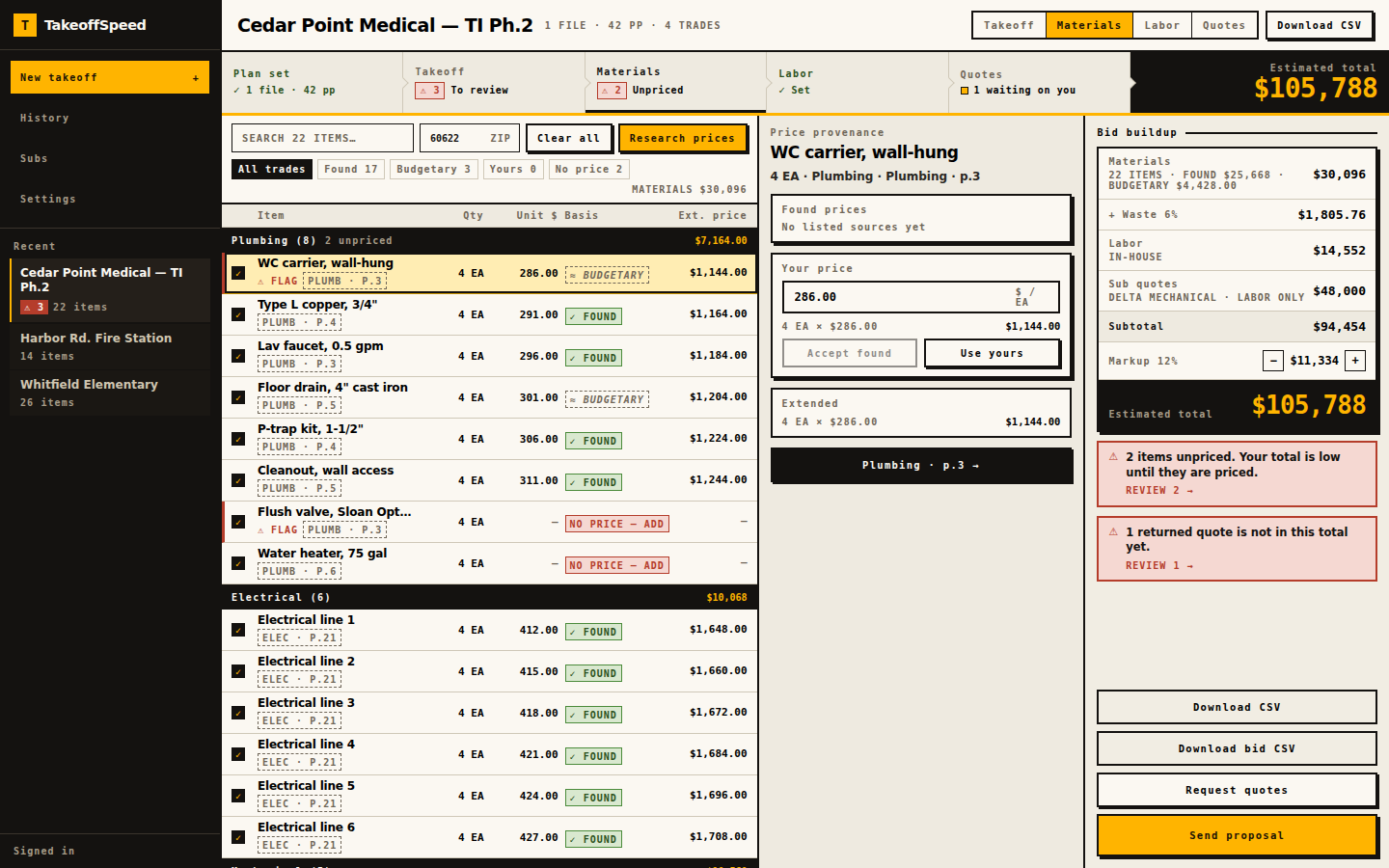
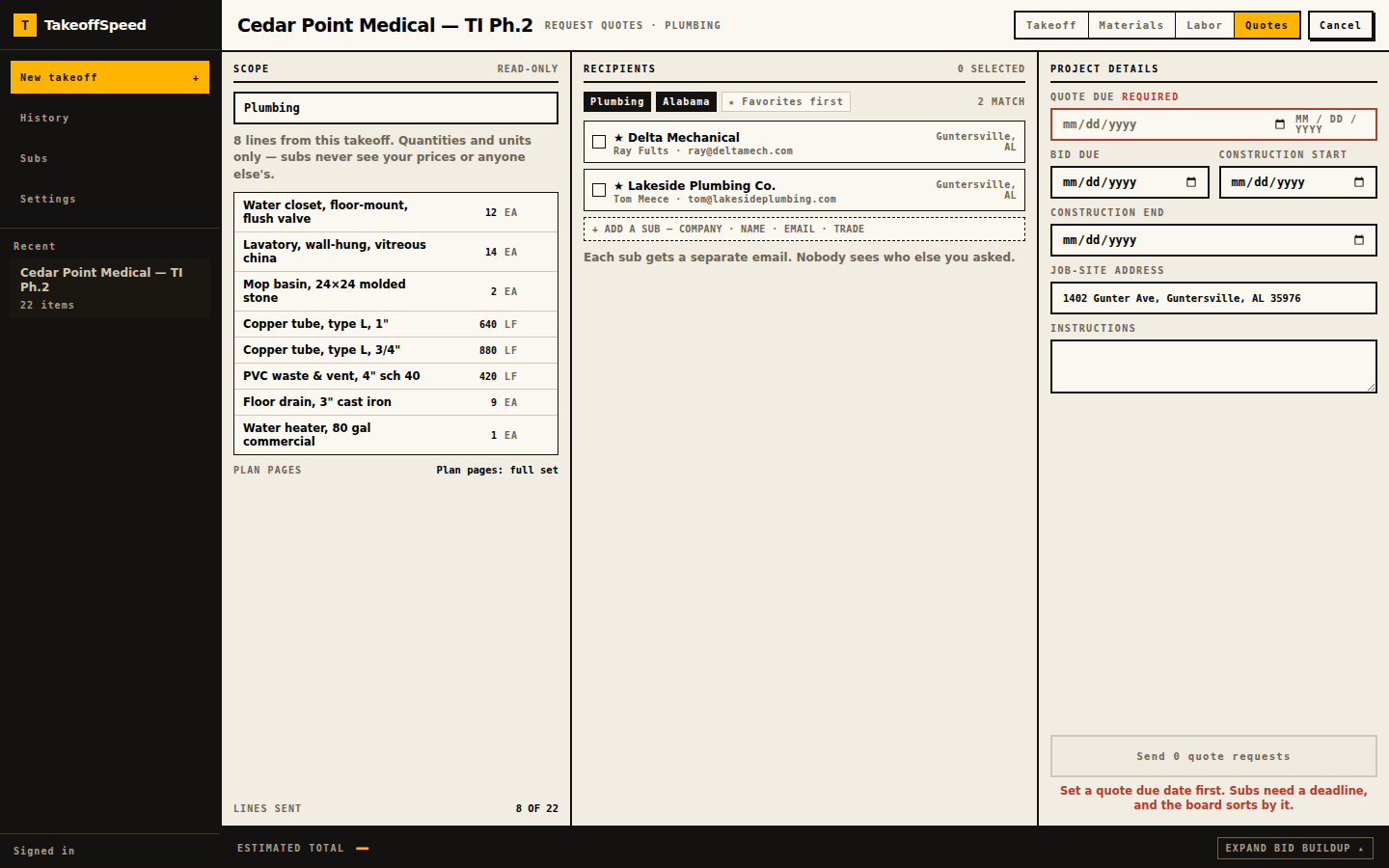
Upload still happens first. Processing time varies with plan size and complexity. Then you work the rest of the loop in the same browser job. Source selected materials as FOUND versus BUDGETARY, or type your supplier’s number. Mark each trade SELF or SUB. Send guest RFQs on SUB work: quantities and units only, no login, due date required. When a quote returns, apply replace-covered-items or labor-only with both totals on screen so plumbing is not in your material column and in the quote. One integer-cents function builds the rail. Export CSV or Word. Unpriced lines print an em dash, never $0.00.
See how it works for the walkthrough. Then run your first bid. First-takeoff guarantee via feedback@takeoffspeed.io. Sunday-Off after 30 days. Cancel anytime. Failed runs do not count. We do not run your company. We help you get the bid out.
- Upload the plans.
- Review the takeoff and supporting evidence.
- Price self-performed materials.
- Send RFQs for subcontracted scope.
- Bring the returned quotes into the bid.
- Check coverage and avoid double-counting.
- Assemble and send the proposal.
In the product
What this supports
The loop after the count is the feature set on this page. Material Source researches live retail at the job ZIP. FOUND is a listed match that passed verification. Budgetary stays labeled as an estimate. NO PRICE — ADD on anything you have not run. You can overwrite a unit price.
Labor on SELF trades is a suggested hours-and-rate allowance, not a sub’s bid. SUB trades wait on a quote. Guest RFQs on Solo, Crew, and Shop: quantities and units only, never your prices or other bidders’ names, your letterhead, TakeoffSpeed as a footer, up to fifteen recipients, trade package or full set when sheets cannot be sorted. Apply is replace-covered-items versus labor-only, both totals before commit. Additional contingency applies to self-performed material costs only. Bid math is one function. CSV and Word in-product.
Browser-based, no desktop installation. PDF takeoff still sits upstream: fourteen scopes, citations, confidence, Needs your eyes. Solo $200 / 5, Crew $399 / 15 (featured), Shop $699 / 40. RFQs are on every plan. Failed runs do not count.
Sample output
The public sample at /sample-bid is the bid view of the golden fixture, not a library of extra jobs. ZIP 34420. Estimated total $196,682.14 from computeBidTotals on the applied run. Additional contingency 10%. Markup 15%. One plumbing quote is applied in replace mode so covered plumbing materials do not also sit in the self-performed total. A coverage exception stays in materials when a line is not in the quote.
That is the point of construction bid software: the rail after the count. Plan-page source is empty on this fixture’s takeoff lines; live takeoffs include available page references for review. CSV and Word stay disabled until you sign in. We do not invent a second job.
What this does not do
No scheduling, no payroll, no change-order log. We do not run your company. We help you get the bid out.
A takeoff, even a reviewed one, is not a submitted bid until prices, coverage, and the proposal exist. A human reviews every line. We do not claim the software awards more work. We do not claim complete supplier coverage. You remain the estimator who sends the number.
FOUND retail is not a negotiated vendor quote. Labor is an allowance. Your first subscription: one free takeoff in a 14-day trial. A credit card is required. Cancel before trial end to avoid billing. Guarantees are first-takeoff and Sunday-Off, both manual at feedback@takeoffspeed.io, plus cancel anytime.
Questions
Why isn’t a finished takeoff the same thing as a bid?
How do I keep a sub’s quote from stacking on my material column?
Which plan actually includes RFQs and the rest of the loop?
What prints on a line I have not priced yet?
Keep going
- AI Construction Takeoff and Bidding Software
- How the Plan-to-Bid Loop Works
- Pricing
- Sample Bid
- Takeoff and Bidding Software for General Contractors
- Estimating Software for Small Contractors
- AI Construction Takeoff Software With Citations
- Construction Takeoff Software for PDF Plans
- Subcontractor RFQ Software With Guest Quote Links