A trade-grouped list from the PDF, then the rest of the loop.
This page is for people who searched construction takeoff software and need an honest map of the category. Some tools are measuring environments: you scale the PDF, click the run of wall, and type the count into a spreadsheet. Others draft a materials list from the set. TakeoffSpeed is the second kind, then it keeps going — because the takeoff is only step one.
If you are a small GC, the small-contractors page is closer to your week. If you want the AI-evidence argument, use the AI construction takeoff page. If you need the bid after the count, use construction bid software. This page is the broader term: how a PDF becomes a trade-grouped list, where measuring-only tools stop, and what still has to happen before you can send a number.
Solo at $200 is five successful takeoffs. Crew at $399 is fifteen and is featured (Most Popular: Full Bid Loop). Shop at $699 is forty. RFQs are on every plan. Failed runs do not count.
The problem
Measuring-only tools are strong at measuring. They are not a bid. You still leave the takeoff environment to price materials, email subs, and rebuild a proposal. The list you clicked together does not carry FOUND versus BUDGETARY, does not send a guest RFQ, and does not warn you when plumbing is in your material column and in the quote.
The other failure is a flat dump: hundreds of rows with no trade grouping, no page citation, and no way to skip Sitework on a kitchen. You wanted a list you can work by discipline.
Sunday night is often when the count finally exists and the bid still does not.
What you get
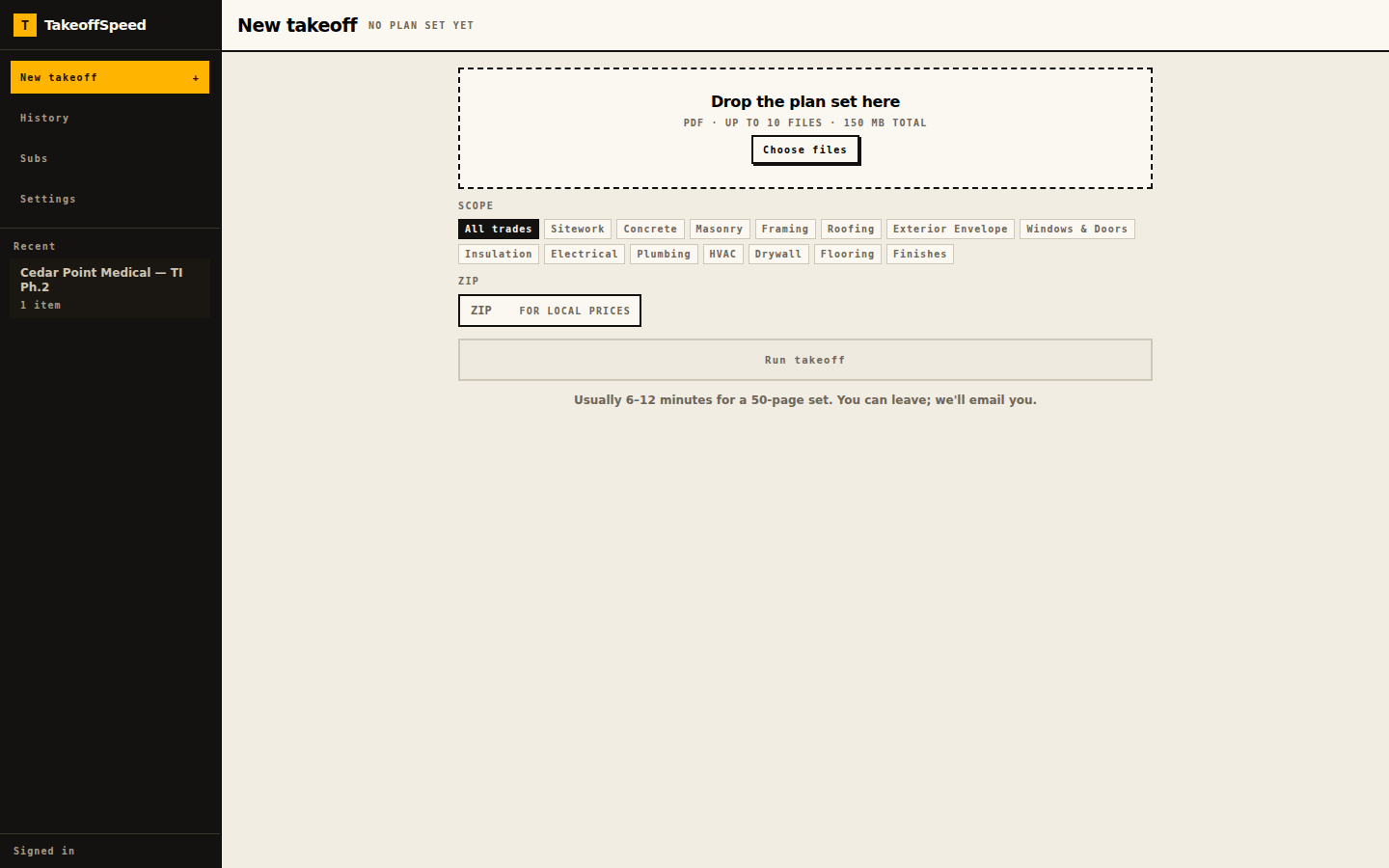
Drop the PDF in the browser. Pick the trades you actually want counted — Framing, Drywall, Plumbing, Electrical, or all fourteen — and type the ZIP. Run takeoff. Processing time varies with plan size and complexity. We email you when the list is ready.
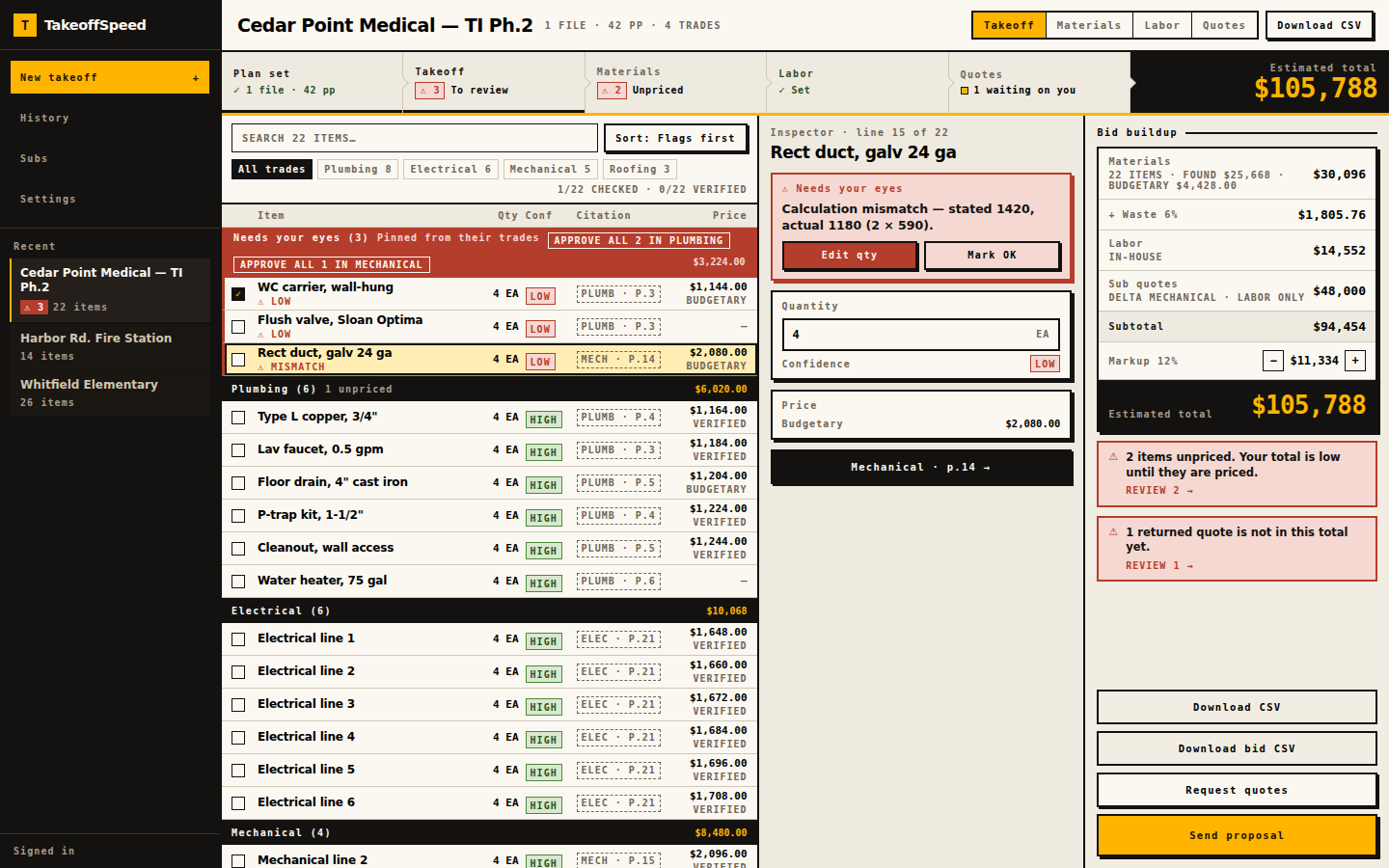
You get a trade-grouped materials takeoff, not a measuring overlay you have to click through sheet by sheet. High-confidence lines cite the plan page. You still review, edit, and then leave the count: source prices, mark SELF or SUB, send RFQs, apply quotes, export. Counting the plans is not the end of the work.
See how it works for the screens. Then run your first bid. First-takeoff guarantee: feedback@takeoffspeed.io. Sunday-Off after 30 days. Cancel anytime. Failed runs do not count. We do not run your company. We help you get the bid out.
- Upload the plans.
- Review the takeoff and supporting evidence.
- Price self-performed materials.
- Send RFQs for subcontracted scope.
- Bring the returned quotes into the bid.
- Check coverage and avoid double-counting.
- Assemble and send the proposal.
In the product
What this supports
Upload is PDF-only, ten files; 150 MB on the drop zone, 200 MB server. The current page allowance is shown before upload. Large or dense sets may exceed processing limits. Fourteen trade chips, Sitework through Finishes, so you are not forced to count a whole building when the invitation is one discipline.
The list comes back grouped by trade. High-confidence items include a page-level citation. HIGH / MED / LOW labels describe evidence. Needs your eyes pins math-mismatch, no-evidence, and unconfirmed-item. You can edit item, quantity, unit, and spec.
Material Source, SELF versus SUB, and guest RFQs are in the same product because the takeoff is only step one. FOUND versus BUDGETARY stays labeled. Unpriced is NO PRICE — ADD, not zero. Guest RFQs: quantities and units only, token page, up to fifteen recipients, due date required, trade sheets plus cover and site plan — or the full set when sheets cannot be sorted by trade. Browser-based. Solo $200 / 5, Crew $399 / 15 (featured), Shop $699 / 40. RFQs are on every plan. CSV and Word export.
Sample output
Open /sample-bid and read the table as a takeoff, not as a second job. It is an anonymised tenant fit-out in ZIP 34420. Tests pin the estimated total at $196,682.14 from computeBidTotals. Additional contingency 10%. Markup 15%. The table is grouped by trade — metal framing, gypsum, ceilings, doors, plumbing, HVAC, electrical, finishes, millwork — so you can see what a trade-grouped list looks like on a real fixture.
Plan-page citations on this fixture’s takeoff lines are empty by admission of that page; live takeoffs include available page references for review. We do not invent a measuring-tool sample on top of the golden run. CSV and Word remain behind sign-in.
What this does not do
No scheduling, no payroll, no change-order workflow. Measuring tools you already use remain strong at measuring. This product’s job is a reviewable list from the PDF plus the loop after the count. We do not run your company. We help you get the bid out.
A human reviews every line. We do not claim complete counts. We do not claim every city has a matched SKU. We do not publish an award-rate. You remain the estimator.
Your first subscription: one free takeoff in a 14-day trial. A credit card is required. Cancel before trial end to avoid billing. First-takeoff and Sunday-Off refunds are manual at feedback@takeoffspeed.io. Cancel anytime.