Quantities only. A guest link. No login for the sub.
This page is for the mixed general contractor who still hangs some of the work and buys the rest — and whose plumber will not create a software account to return a number. You already have a PDF set. You need a request that carries quantities and units, not your material prices, not the other bidders’ names, and not a login wall. Guest RFQ links are the workflow this page is about. The takeoff is only step one; this is how SUB scope leaves the office.
If you wanted the whole loop after the count, use construction bid software. If you wanted SELF versus SUB on the labor table, that sibling page is next. If you are the trade receiving the link, use the trade-contractors page. This page is written for the shop that sends the request.
Solo at $200 is five successful takeoffs a month and already includes RFQs. Crew at $399 is fifteen and is the featured plan (Most Popular: Full Bid Loop) when you are coordinating several trades on the same set. Shop at $699 is forty. RFQs are on every plan. Failed runs do not count.
The problem
The usual RFQ is a marked-up PDF in an email thread. The attachment still has a unit-price column, or a second plumber’s name in the filename, or a login the sub will not complete from a truck. The request dies in the inbox. You cannot tell whether anyone opened it.
Count-only tools stop when the list exists. They do not freeze a price-free snapshot or record viewed as “the link was opened.” Company suites want the sub inside a project-management login you already refused.
Sunday night is when the unanswered RFQ becomes a guess in the proposal. Sunday-Off is written for that week: still doing manual takeoffs on Sunday night after 30 days? Full refund.
What you get
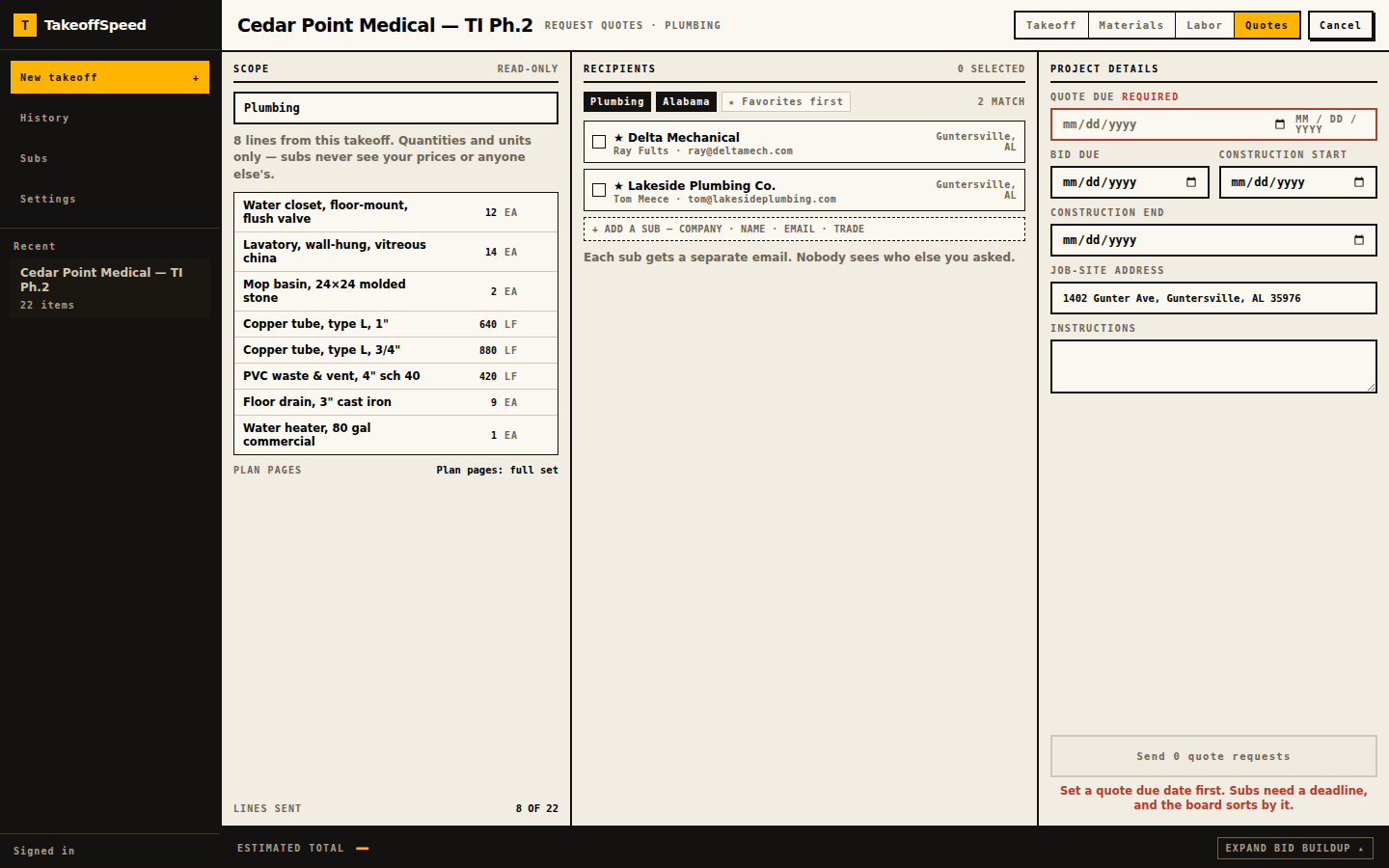
Upload the PDF first. Processing time varies with plan size and complexity. We email you when the takeoff is ready. Review the list, mark the trades you buy as SUB, then send guest RFQs from the same job. Each sub gets a private token page, no login, quantities and units only — never your prices, never other bidders’ names. The request goes out under your letterhead. TakeoffSpeed is a footer line. Up to fifteen subs per send. A quote due date is required before anything sends. Trade sheets plus the cover and site plan travel with the request, or the full set when sheets cannot be sorted by trade.
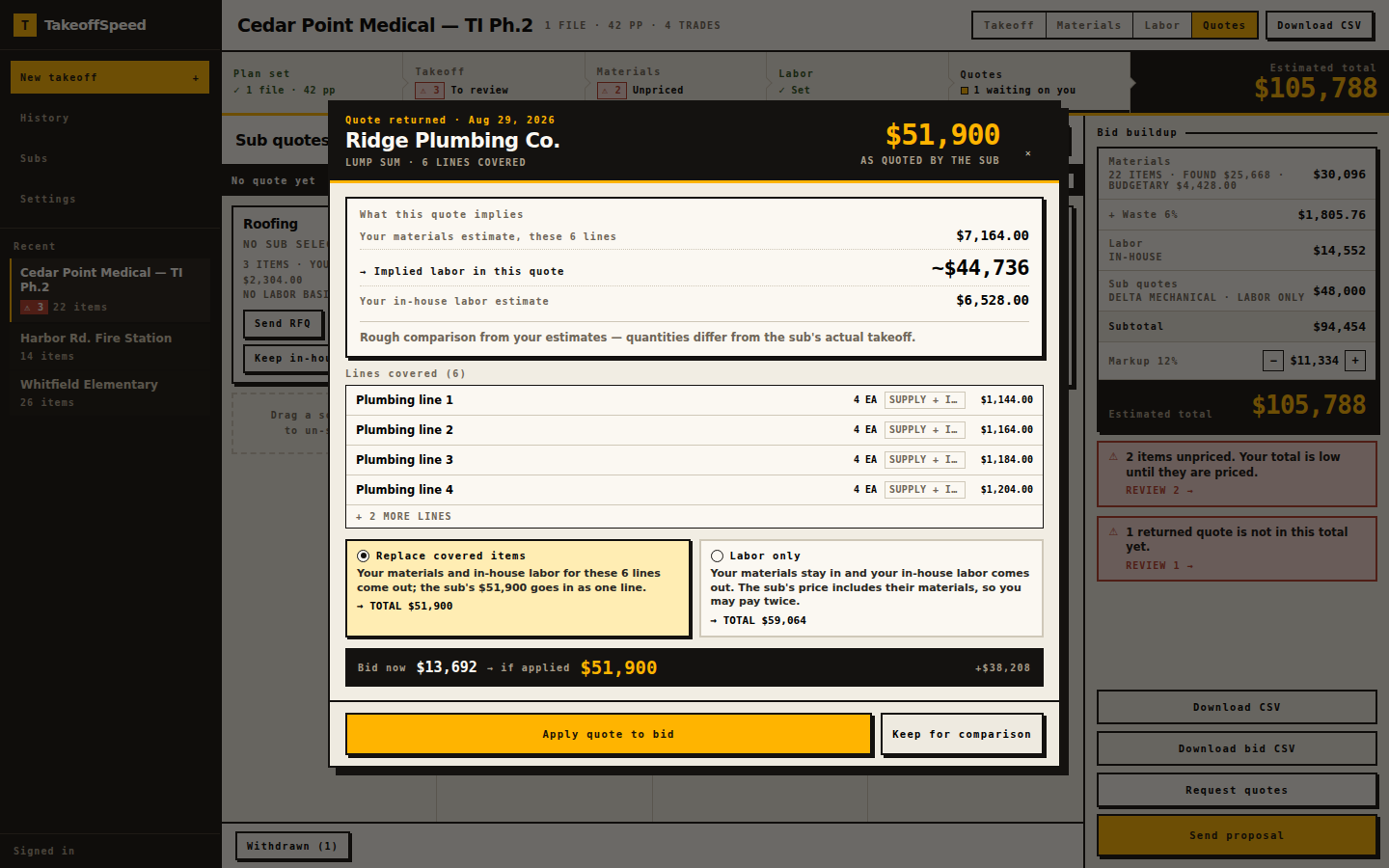
Statuses on your board: sent, viewed, returned, applied, compare, withdrawn. Viewed means the link was opened, not that they liked the job. When a quote returns, you apply it without stacking it on materials. Export CSV or Word. Unpriced lines print an em dash, never $0.00.
See how it works on the walkthrough if you want the screens first. Then run your first bid. If that first takeoff does not earn its keep, email feedback@takeoffspeed.io and the month is refunded. Sunday-Off after 30 days. Cancel anytime. Failed runs do not count. We do not run your company. We help you get the bid out.
- Upload the plans.
- Review the takeoff and supporting evidence.
- Price self-performed materials.
- Send RFQs for subcontracted scope.
- Bring the returned quotes into the bid.
- Check coverage and avoid double-counting.
- Assemble and send the proposal.
In the product
What this supports
Guest RFQs on Solo, Crew, and Shop. The snapshot is rebuilt from an allowlist so price-like fields are not supposed to reach the sub: item, quantity, unit, spec — that is the line. Each recipient gets their own token and their own email. Recipients are not exposed to one another. Token pages authenticate the guest; they expire. Statuses: sent, viewed, returned, applied, compare, withdrawn. Viewed means the link was opened.
Your company name and logo head the email and the quote page. TakeoffSpeed is a footer. Up to fifteen subs per send; split a larger blast. A quote due date is required — Send stays blocked until it is set. Attached plans are the sheets for that trade plus cover and site plan, or the full set when the sheets cannot be sorted by trade, and the page says so instead of pretending a clean trade package always exists. Sub-list import up to 2,000 rows.
Upstream of the send: browser-based, no desktop installation. PDF only, ten files, 150 MB upload; the server accepts up to 200 MB. The current page allowance is shown before upload. Large or dense sets may still exceed processing limits. After the return: apply replace-covered-items or labor-only. Bid arithmetic is one integer-cents function. CSV and Word export live in the product.
Sample output
The ungated example at /sample-bid is the golden tenant fit-out the tests pin — not a second invented job. ZIP 34420. One returned plumbing quote from Coastal Plumbing is already applied in replace mode. Estimated total $196,682.14 from computeBidTotals. Additional contingency 10%. Markup 15%.
Read it as the end of an RFQ, not as a library of extra sends. Covered plumbing materials sit in the quote instead of the self-performed column. Coverage exception t4-8 stays in materials because that line is not in the quote. Plan-page source is empty on this fixture’s takeoff lines; live takeoffs include available page references for review. CSV and Word stay disabled until you sign in.
What this does not do
An RFQ is not a purchase order, a schedule, or a change-order log. TakeoffSpeed does not run payroll, does not dispatch crews, and does not manage the job after the proposal leaves. We do not run your company. We help you get the bid out.
The takeoff behind the snapshot is a starting point. A human reviews every line before you send quantities to a sub. We do not claim every sheet sorts cleanly by trade. When it cannot, the sub receives the full set and you should say so in your scope note. We do not claim a higher award-rate from sending more links. Viewed is not a commitment.
Your first subscription: one free takeoff in a 14-day trial. A credit card is required. Cancel before trial end to avoid billing. First-takeoff and Sunday-Off refunds are manual via feedback@takeoffspeed.io. Cancel anytime.
Questions
Does a sub need a TakeoffSpeed login to return a quote?
What does viewed mean on an RFQ status?
Can two plumbers on the same send see each other or my prices?
Which sheets go out when the set cannot be sorted by trade?
Keep going
- AI Construction Takeoff and Bidding Software
- How the Plan-to-Bid Loop Works
- Pricing
- Sample Bid
- Takeoff and Bidding Software for General Contractors
- Bidding Software for Trade Contractors
- Construction Bid Software After the Takeoff
- Avoid Double-Counting Subcontractor Quotes
- Self-Performed vs Subcontracted Scope