Apply the quote so plumbing is not paid twice.
This page is for the estimator who has already been burned by a plumber’s number sitting on top of the same fixtures in the material column. You are not shopping for another measuring overlay. You are shopping for the apply step: replace-covered-items versus labor-only, both implied totals on screen before you commit, and one integer-cents function so the rail matches the proposal.
The construction-bid-software page is the whole loop after the count. The RFQ sibling is how the guest link goes out. This page is the coverage choice that keeps plumbing from being paid twice. Mixed GC shops, hired desks, and remodel interiors all land here when the quote returns.
Solo at $200 is five successful takeoffs. Crew at $399 is fifteen and is featured (Most Popular: Full Bid Loop). Shop at $699 is forty. RFQs are on every plan because you cannot apply a quote you never collected. Failed runs do not count.
The problem
The professional error is addition. The takeoff priced the valves. The sub quoted supply-and-install. You pasted $48,000 onto $18,000 of plumbing material and called it a bid. The owner never sees the overlap. You eat it in the field, or you look careless in the interview.
Spreadsheets do not warn you. Measuring tools do not apply coverage. A $0.00 on an unpriced line looks like a number you meant. Additional contingency that also hits the sub’s lump sum inflates the quote a second time. Labor-only and replace are not the same apply, and a UI that hides one of the totals until after Save is how the twice-paid fixture happens.
Sunday-Off exists because that reconciliation still eats the weekend: still doing manual takeoffs on Sunday night after 30 days? Full refund.
What you get
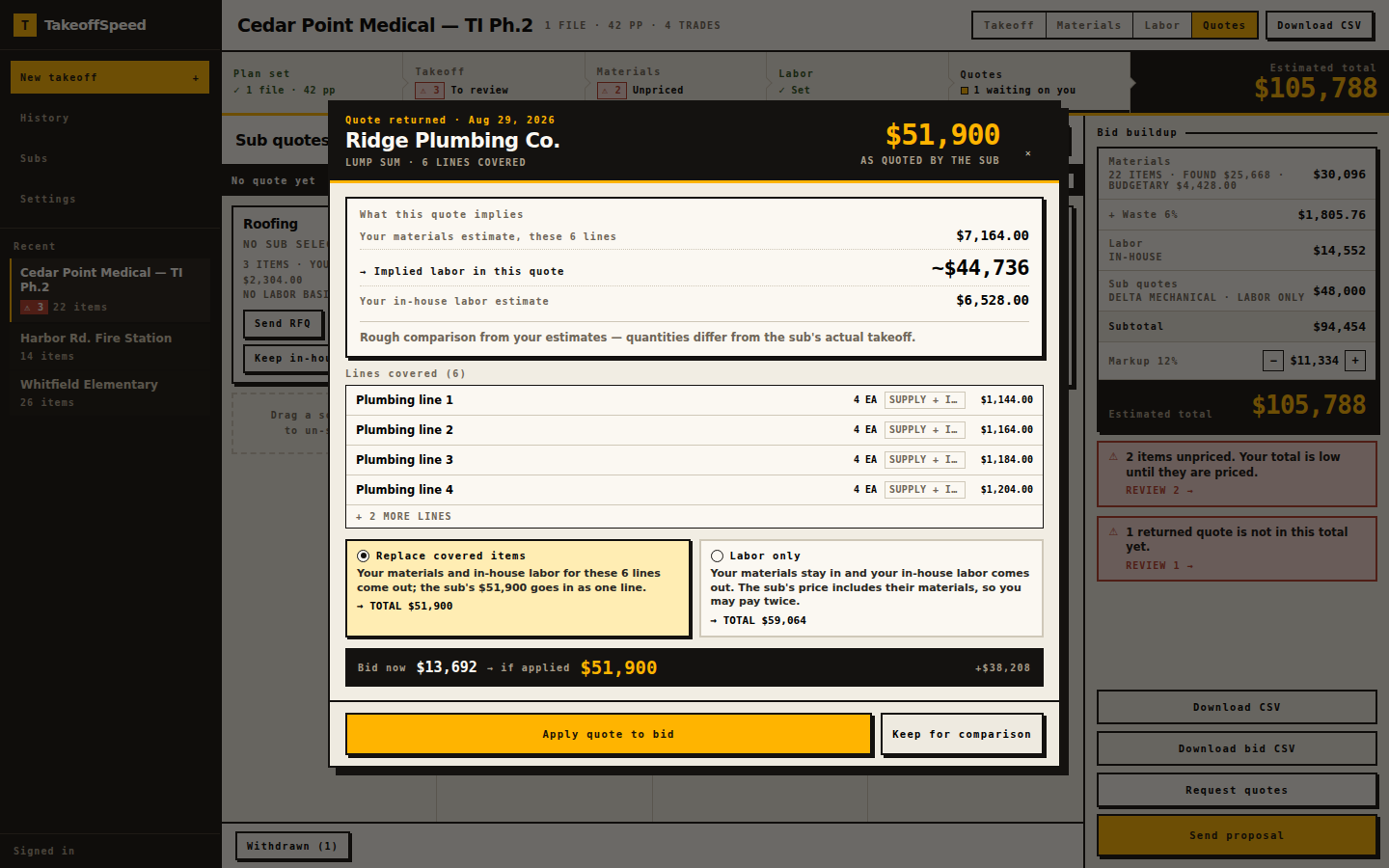
Upload still happens first. Processing time varies with plan size and complexity. Close the tab; we email you. After you review, price SELF materials, and collect a returned quote, you open apply. Replace-covered-items pulls covered materials out of the self-performed column and drops that trade’s suggested labor, then adds the quote once. Labor-only keeps the materials, drops the in-house labor on that trade, and adds the quote — and the product still shows the pay-twice warning so you do not pretend fixtures vanished. Both implied totals sit on screen before you commit.
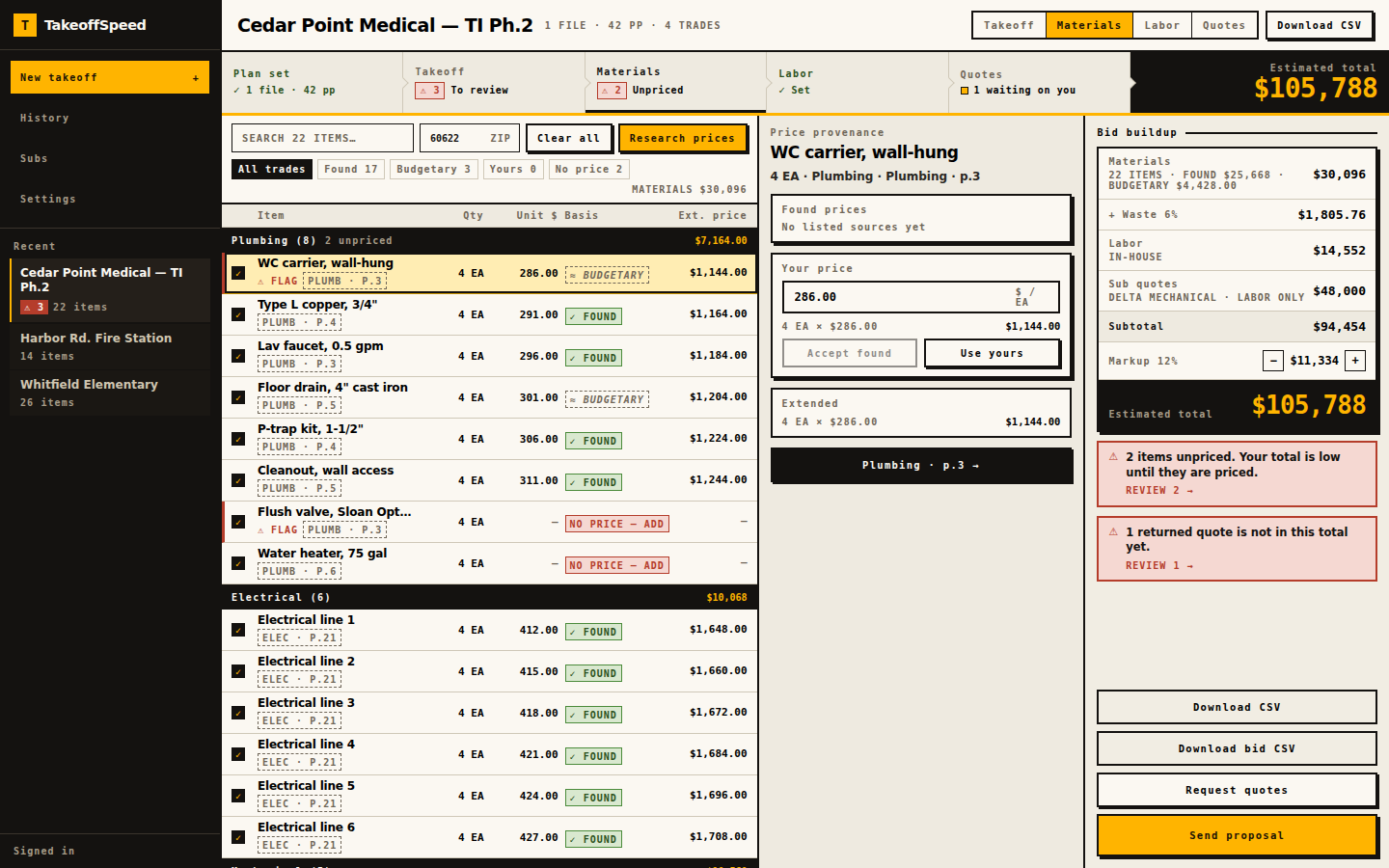
Additional contingency applies to self-performed material costs only. Applied quote amounts do not receive additional contingency. Bid math is computeBidTotals in integer cents. Unpriced lines print an em dash, never $0.00. A coverage exception stays in materials when the line is not in the quote.
See how it works for the walkthrough. Then run your first bid. First-takeoff guarantee: email feedback@takeoffspeed.io if that first takeoff does not earn its keep. Sunday-Off after 30 days. Cancel anytime. Failed runs do not count. We do not run your company. We help you get the bid out.
- Upload the plans.
- Review the takeoff and supporting evidence.
- Price self-performed materials.
- Send RFQs for subcontracted scope.
- Bring the returned quotes into the bid.
- Check coverage and avoid double-counting.
- Assemble and send the proposal.
In the product
What this supports
Apply is replace-covered-items versus labor-only. Compare is on the board so you can hold a number without writing it onto the run. Covered keys are computed from the applied quote at read time; takeoff lines are not mutated, so un-apply restores the previous rail. Both implied totals show before commit.
computeBidTotals is the only bid arithmetic: materials, additional contingency on self-performed material costs only, labor, quote, then markup. Integer cents. Quote amounts do not receive additional contingency. Contractor markup does apply to the quote. Unpriced prints an em dash on the export, never $0.00. In the materials table the same gap is NO PRICE — ADD.
Guest RFQs on Solo, Crew, and Shop feed this screen: quantities and units only, token page, up to fifteen recipients, due date required. Browser-based. Fourteen scopes. CSV and Word in-product. Solo $200 / 5, Crew $399 / 15 (featured), Shop $699 / 40. RFQs are on every plan. Failed runs do not count.
Sample output
Open /sample-bid for the applied run the tests pin — not a second job. ZIP 34420. Coastal Plumbing’s quote is applied in replace mode. Estimated total $196,682.14 from computeBidTotals. Additional contingency 10%. Markup 15%. Covered plumbing materials leave the self-performed column. Coverage exception t4-8 stays in materials because that line is not in the quote.
That exception is the point of this page: replace is not “delete the whole trade.” Lines the quote does not cover remain yours to price or to dash. Plan-page source is empty on this fixture’s takeoff lines; live takeoffs include available page references for review. CSV and Word remain behind sign-in.
What this does not do
Apply does not schedule the plumber, run payroll, or open a change-order log when the quote and the drawing later disagree. We do not run your company. We help you get the bid out.
A human reviews every line, including which coverage exceptions stay in materials. The product will not guess that a fixture the sub omitted was meant to be in the quote. Labor-only still warns you about paying twice; it does not hide the overlap. We do not claim complete counts or a higher award-rate from cleaner math.
FOUND retail on leftover material lines is not a negotiated vendor quote. Your first subscription: one free takeoff in a 14-day trial. A credit card is required. Cancel before trial end to avoid billing. Guarantees are first-takeoff and Sunday-Off, both manual at feedback@takeoffspeed.io, plus cancel anytime.
Questions
Do both implied totals show before I commit replace or labor-only?
Does additional contingency hit the subcontractor quote?
What happens to a coverage exception such as t4-8?
Why does an unpriced leftover line print an em dash after apply?
Keep going
- AI Construction Takeoff and Bidding Software
- How the Plan-to-Bid Loop Works
- Pricing
- Sample Bid
- Takeoff and Bidding Software for General Contractors
- Bidding Software for Trade Contractors
- Construction Bid Software After the Takeoff
- Subcontractor RFQ Software With Guest Quote Links
- Self-Performed vs Subcontracted Scope