A first-pass takeoff an estimator can audit.
This page is for the person whose job is the bid, not the person who also hangs the drywall. You may be the only estimator in a small GC, or one desk in a shop that keeps several bids alive at once. You already know how to takeoff. You have used Bluebeam, PlanSwift, a spreadsheet, or all three. You are not shopping for a tool that pretends it can sit in your chair. You want a first-pass list you can audit, price, and turn into a proposal without retyping the job four times.
Bidding solo? See the small-contractors page. Running a mixed GC? See general-contractors. Either way, review every citation and total.
Shop at $699 is forty successful takeoffs a month for a desk running several bids at once. Crew at $399 is fifteen — the featured plan on volume (Most Popular: Full Bid Loop) when you cover one small GC. Solo at $200 is five. RFQs are on all three. Failed runs do not count.
The problem
The professional failure mode is not “I cannot count.” It is that the count, the price, the sub quote, and the proposal do not share a trail. You measure in one tool. You price in a spreadsheet. You email subs a marked-up PDF. You paste returned numbers into a proposal and hope nothing was counted twice. When an owner asks where a quantity came from, you need a page, not a vibe.
An AI list that hides the evidence is a liability. If it cannot show the sheet, cannot flag arithmetic that does not work, and cannot tell FOUND from BUDGETARY, you will rebuild it anyway. You also cannot wait on a sub to create an account. If the quote link needs a login, it dies in their inbox. Prices on that link would leak your bid.
What you get
You upload the PDF. Processing time varies with plan size and complexity. Close the tab and wait for the email. Then review starts. High-confidence lines should open the plan page they came from. Needs your eyes pins math-mismatch, no-evidence, and unconfirmed-item. Estimated-quantity is a softer glance and does not inflate the headline count.
You edit item, quantity, unit, and spec. You mark a flag OK when you have checked it. You run Source on selected lines and keep FOUND and BUDGETARY honest. You assign SELF versus SUB per trade, send guest RFQs, and apply a returned quote as replace-covered-items or labor-only with both totals on screen so you do not pay twice. One function in integer cents builds the rail. You export CSV or Word. Unpriced lines are an em dash.
See how it works if you want the walkthrough before you pay. Then run your first bid. First-takeoff guarantee via feedback@takeoffspeed.io. Sunday-Off after 30 days. Cancel anytime. We do not run your company. We help you get the bid out.
- Upload the plans.
- Review the takeoff and supporting evidence.
- Price self-performed materials.
- Send RFQs for subcontracted scope.
- Bring the returned quotes into the bid.
- Check coverage and avoid double-counting.
- Assemble and send the proposal.
In the product
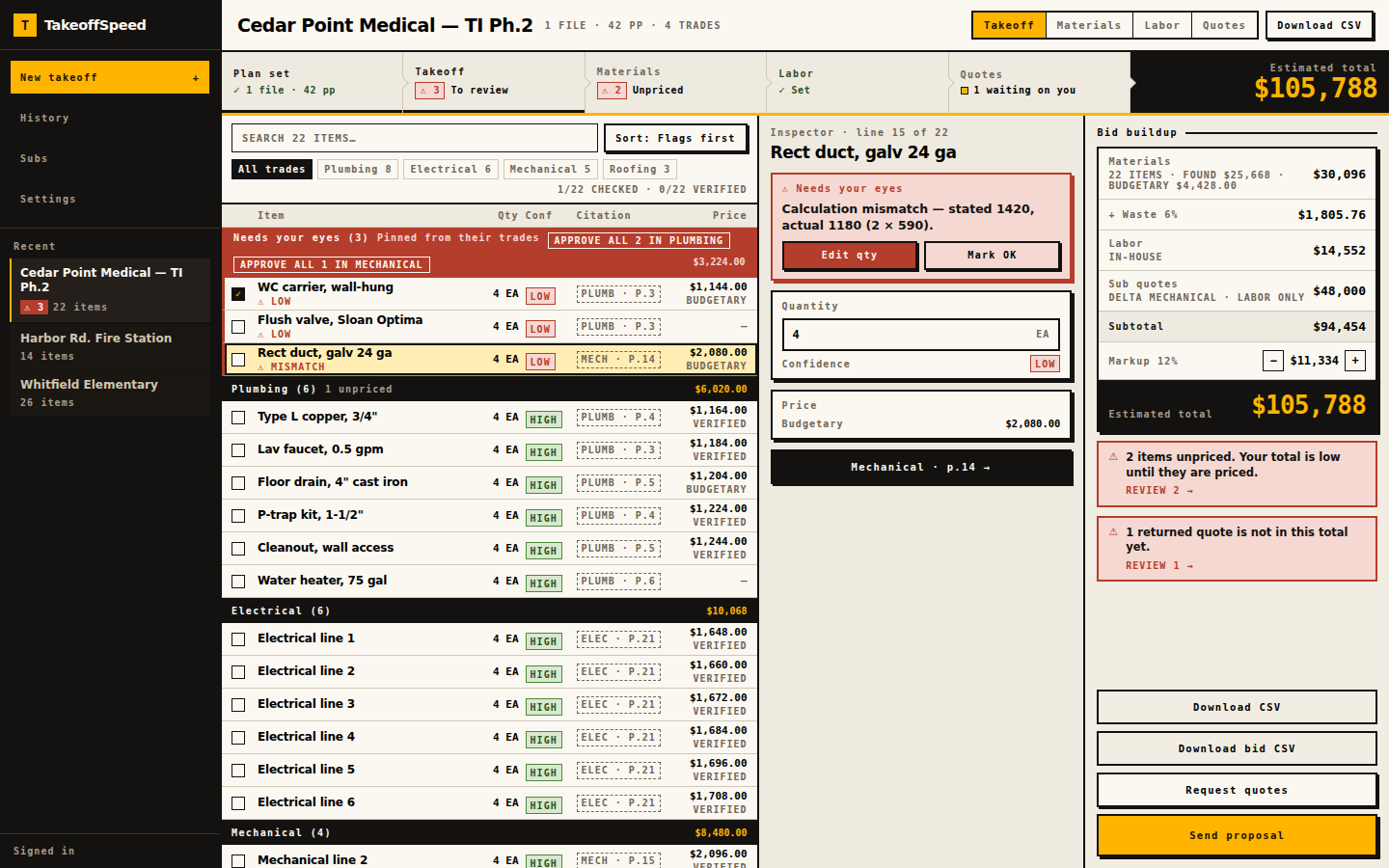
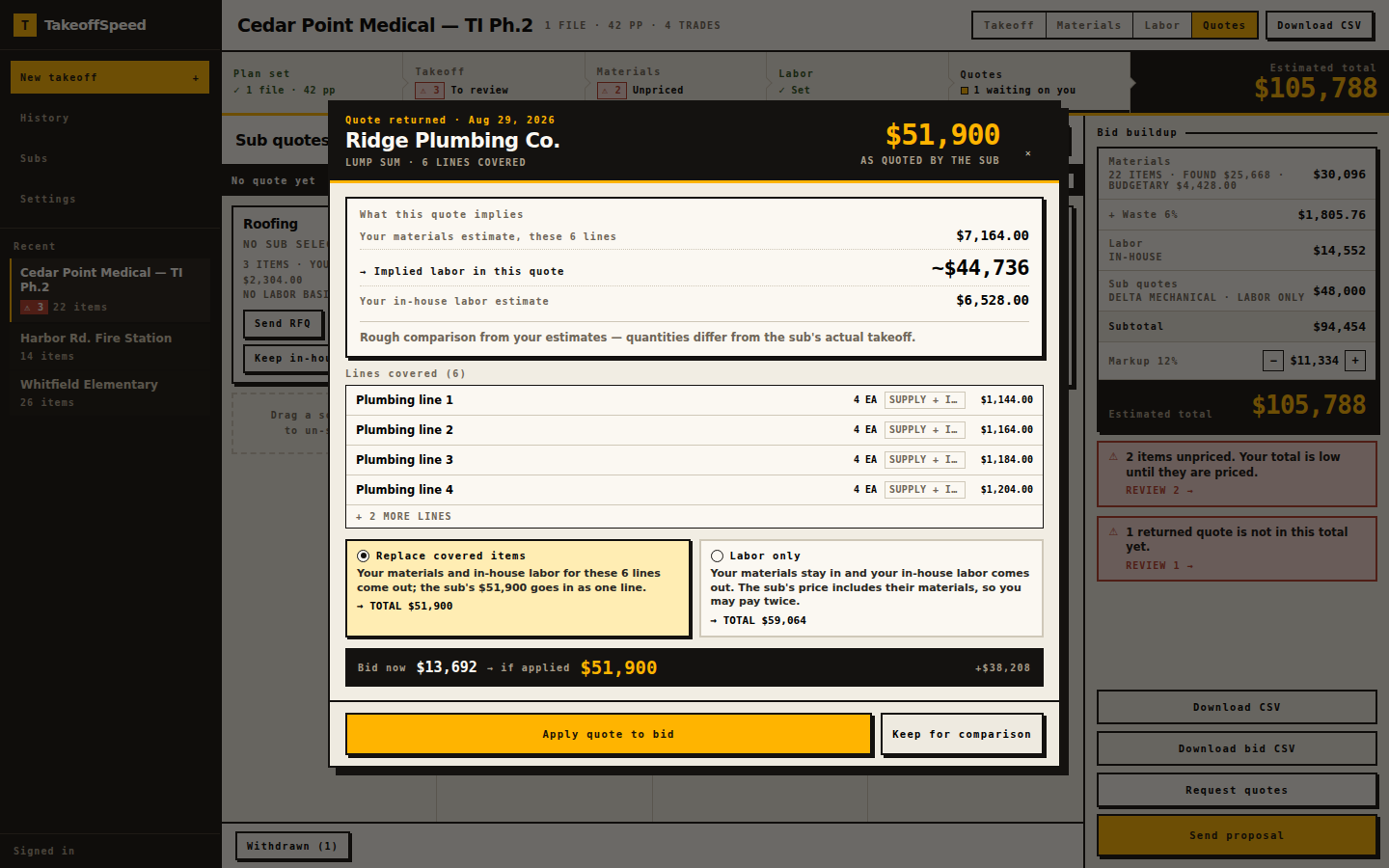
What this supports
Reviewability is the feature that matters here. The takeoff is trade-grouped. High-confidence items include a page-level citation. Click the chip; the sheet opens. Missing pages are demoted — you should not see a HIGH line with nowhere to look. A math-mismatch flag quotes the arithmetic, not a generic warning.
Line-item editing is real: item name, quantity, unit, spec. Approval is real: mark OK, and those rows leave the Needs your eyes headline. Source attaches a retailer or product on priced lines and keeps budgetary estimates labeled. You can paste your own unit price. Labor hours and rates are suggested starting points on SELF trades, labelled as suggested, not as a historical cost database.
RFQ snapshots use an allowlist to keep price-like fields from reaching the sub. Token links authenticate the guest; they expire. Statuses: sent, viewed, returned, applied, compare, withdrawn. Viewed means the link was opened. Apply is replace-covered-items versus labor-only, both totals before commit. Browser-based, no desktop installation. PDF only, ten files; 150 MB upload, 200 MB server. The current page allowance is shown before upload. Fourteen scopes. Fifteen RFQ recipients per send. Sub-list import up to 2,000 rows. CSV / Word export.
Sample output
Open /sample-bid as an estimator would: ignore the project nickname and read the trail. It is an anonymised tenant fit-out in ZIP 34420. Tests pin the estimated total at $196,682.14 from computeBidTotals on the golden applied run. Additional contingency 10%. Markup 15%. One plumbing quote is applied in replace mode so covered plumbing lines do not also carry a material extended price.
The public table shows item, qty, unit, spec, confidence, plan source, and citation. On this fixture the plan-page source column is empty — the page says so — while live takeoffs include available page references for review. Quote-covered plumbing rows show they sit in the sub’s quote instead of a material price. CSV and Word remain behind sign-in. We do not invent a second job.
What this does not do
This is a reviewable first pass. A human reviews every line. You still own every number that leaves the office. Do not treat confidence as a grade of your skill; it is a grade of the evidence on that row. The product does not sit in the estimator’s chair.
There is no scheduling, payroll, change-order workflow, or company-wide PM. There is no promise of complete counts, no city-coverage map, and no award-rate. Measuring tools you already use remain strong at measuring. This product’s job is the loop after the count: evidence, prices, RFQs, coverage, proposal.
FOUND is a listed match on the lines you actually run through Source, not a negotiated vendor quote and not a price on every row. Unpriced lines stay an em dash on purpose. A bid sent too early is obviously incomplete.
Your first subscription: one free takeoff in a 14-day trial. A credit card is required. Cancel before trial end to avoid billing. Guarantees are the first-takeoff refund and Sunday-Off, both manual at feedback@takeoffspeed.io, plus cancel anytime.